Questions traders ask.
LotsBack answers the questions traders ask before they connect a broker account. Each has a plain answer and a link to the full cashback terms. If something here is unclear, the cashback terms say it in full, and show what changed and when.
Browse the video guidesThe basics
What is LotsBack?
LotsBack is a cashback service for forex traders. Your broker pays us for the trading you do. We share part of that with you, per lot, in USDT or USDC.
How does LotsBack make its money?
From brokers, not from you. A broker pays LotsBack for the traders we bring it. Your cashback is a share of that. We never take a cut of your payout.
Does LotsBack cost anything?
No. The only cost is the network fee on a payout, which you see and accept before you confirm.
Who holds my money?
Your broker. LotsBack only reads your closed trades and cannot touch your balance.
Is LotsBack a broker?
No. You trade at your broker, as you do now. LotsBack sits beside it. It reads your closed trades and pays you cashback on them.
Does cashback change my spread or my commission?
No. You trade on the same terms as anyone else at that broker. Cashback comes from what the broker pays LotsBack, not from a change to your account.
Do losing trades count?
Yes. Cashback is paid on the lots you trade, not on whether the trade won or lost.
What does LotsBack do with my trades?
It counts the lots and prices them at your broker's published rate. It also builds your journal and calendar from them. It never trades, and it never moves money.
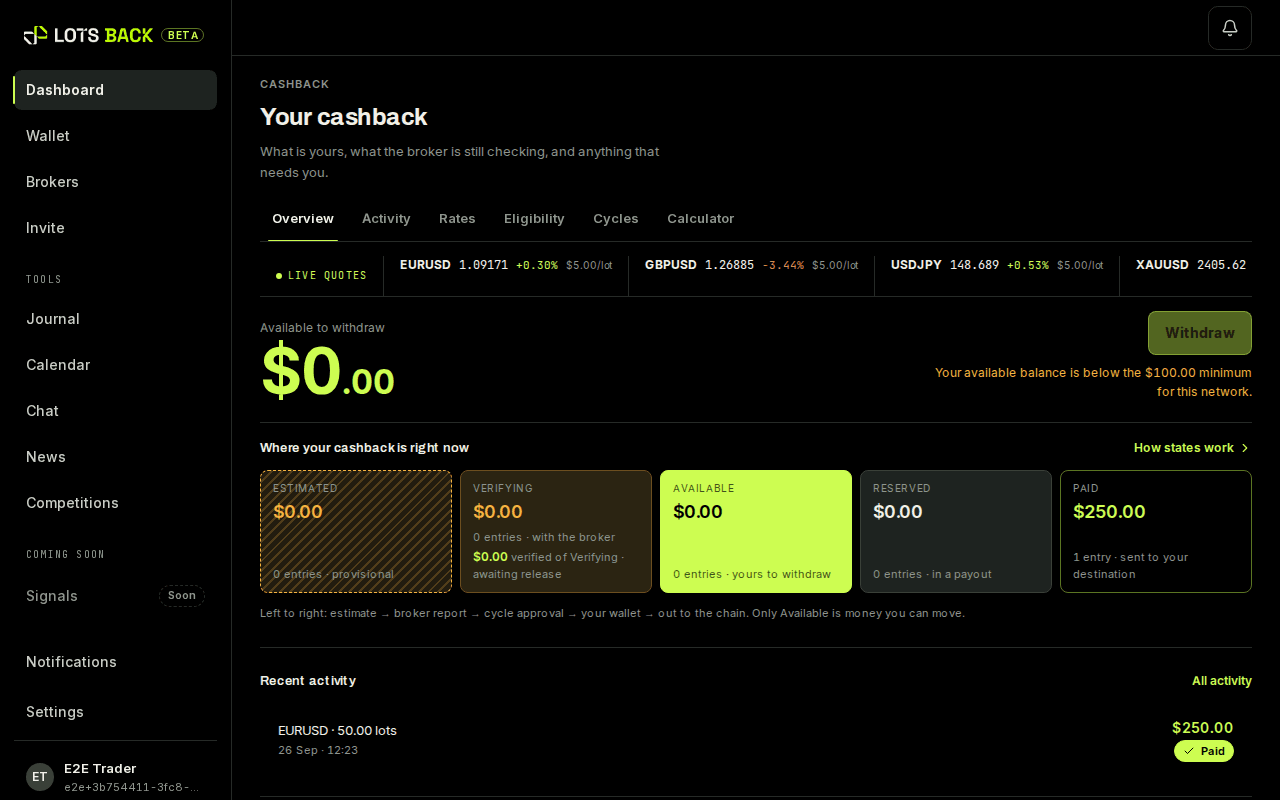
The dashboard: every closed trade, its estimate and its state.
Your account
Do I need a password?
No. You sign in with a link sent to your email address.
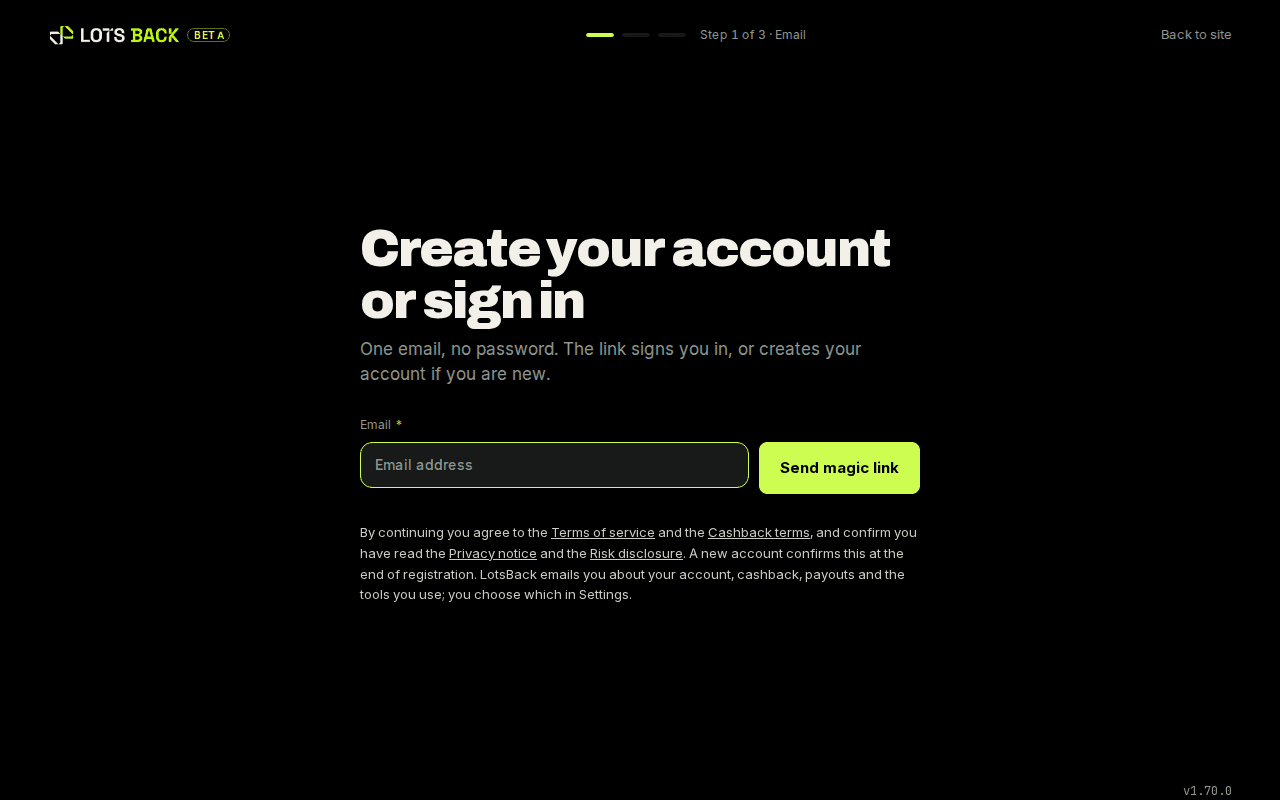
Sign in: one email field, no password. The sign-in email has not arrived. What do I do?
Wait a minute, then check your spam folder. The link is valid for 15 minutes. If it has expired, enter your email again and a fresh one is sent.
Can I have more than one LotsBack account?
No. One person, one account. You can connect several trading accounts to it, at one broker or at several.
Can I connect a trading account in someone else's name?
No. Every trading account you connect must be in your own name. This is in the terms you accept at sign-up.
Do I need to verify my identity?
Your broker already has. LotsBack relies on the broker's own checks and does not ask you for documents unless a compliance review requires it.
Is cashback available in every country?
No. It depends on the broker, the account type and the instrument. Each broker sets who it accepts and which accounts earn; your account's own conditions are listed on your eligibility page once it is connected.
How old do I have to be?
18 or over. You confirm this when you accept the terms.
How do I choose which notifications I get?
Go to Notifications and open the preferences. Each type has a switch for the app and one for email. A change saves at once. Security notices stay on.
How do I close my account?
Email support@lotsback.com from the address you signed up with. Withdraw anything Available first. Records we must keep by law stay for the time the privacy notice states.
How do I get the $10 Telegram bonus?
Connect your Telegram account in Settings. Once you have traded 5 eligible lots with LotsBack, $10 is added to your wallet with your cashback. One per person and one per Telegram account, and Telegram has to stay connected until it is paid.
How do I get the $5 email bonus?
If you signed up with Telegram and your account has no email, add one from the banner on your dashboard. Once the code confirms it, $5 is in your wallet with your cashback. One per person, one per email address and one per Telegram account.
Brokers and connecting
Which brokers does LotsBack work with?
The brokers page lists every supported broker, with its published rate per lot, the account types it covers and the rate's effective date.
Why is my cashback on hold?
Your account isn't linked to LotsBack yet. Open it in LotsBack: the Link your account card has the email to send your broker, with our partner code. Trades opened before the broker moves the account never count. Trades opened after it moves earn cashback.
Which trading platforms can LotsBack read?
MetaTrader 5 and TradeLocker. The link is read-only. LotsBack sees closed trades and cannot trade.
Does an older MetaTrader account work?
No. Only MetaTrader 5 and TradeLocker accounts earn cashback. If your broker offers an older MetaTrader version too, open a MetaTrader 5 account.
Do cent, demo, ECN or Raw accounts earn cashback?
No. They can be connected and they show in your journal, but they never earn. Open a Standard or STP account. ECN and Raw accounts do not earn cashback.
Can I use the broker account I already have?
Often, yes. Some brokers can move an existing account to LotsBack. You ask in the broker's portal, and LotsBack tells the broker who you are. Others need a new account opened through the partner link.
What is the partner link?
The link on the Open account button inside LotsBack. It tells the broker that you came from LotsBack. Open your broker account through it and the broker credits LotsBack for your trading.
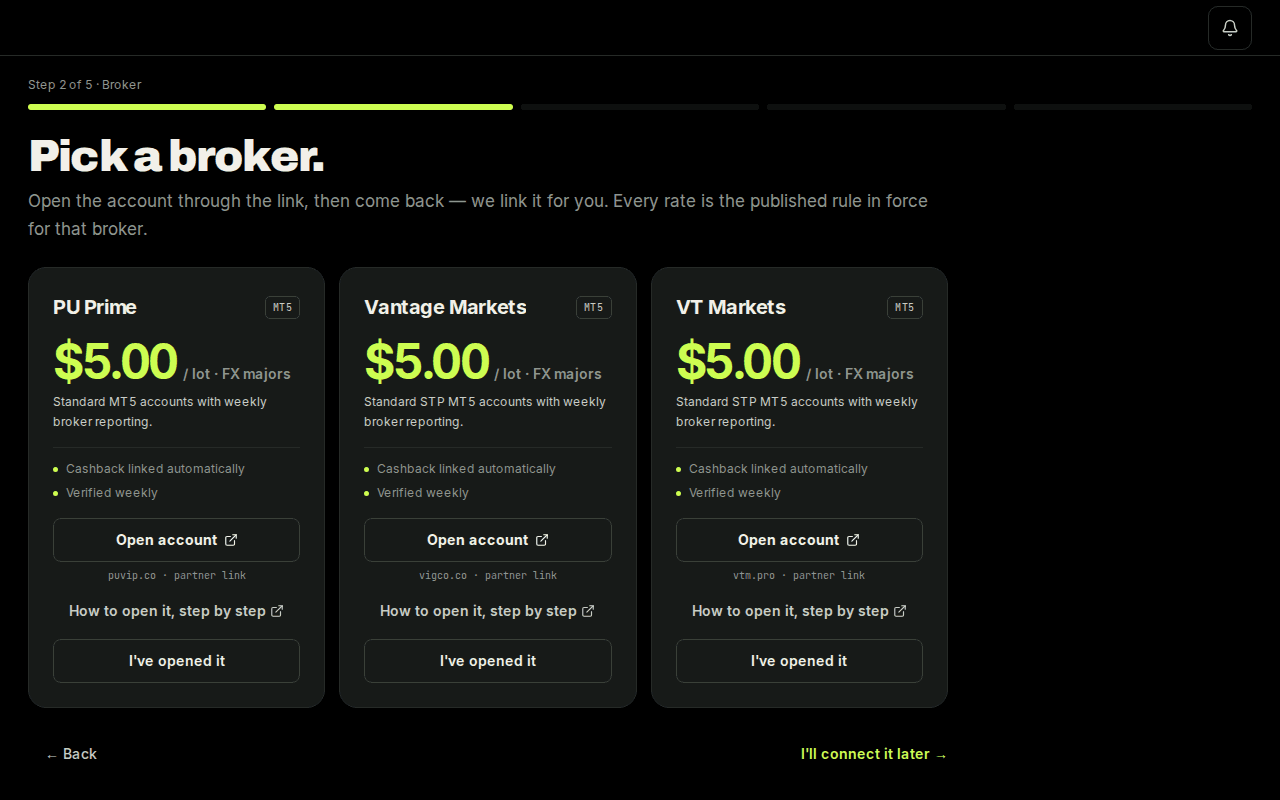
Open account on a broker tile is the partner link. What do I need to connect a MetaTrader 5 account?
Three things from your broker: the server name, the login (account number) and the investor password. The step-by-step guide shows where each one is.
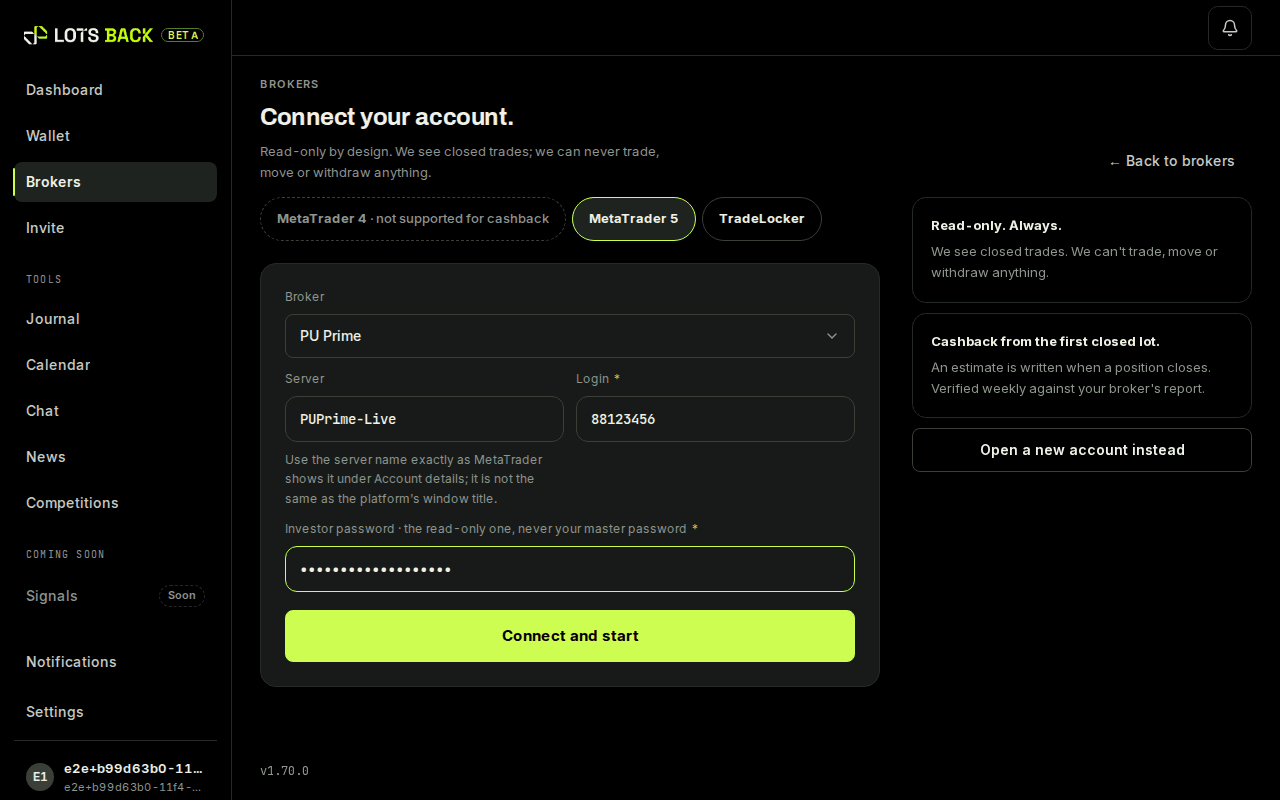
The connect form: server, login, investor password. What is an investor password?
A read-only password for a MetaTrader account. It lets a program see the trades and nothing more. It cannot open a trade, close one, or withdraw. It is the only password LotsBack accepts.
Where do I find the investor password?
In the email your broker sent when the account was opened, or in the broker's client portal under the account's settings. If you do not have one, set it in the MetaTrader 5 app: see How do I get my investor password?
How do I get my investor password?
Set it yourself in the MetaTrader 5 app. This works at every broker, including PU Prime, whose client portal has no investor-password section.
- Open MetaTrader 5 and sign in to your trading account with your main password.
- Tap Settings (bottom right), then tap your account at the top of the list.
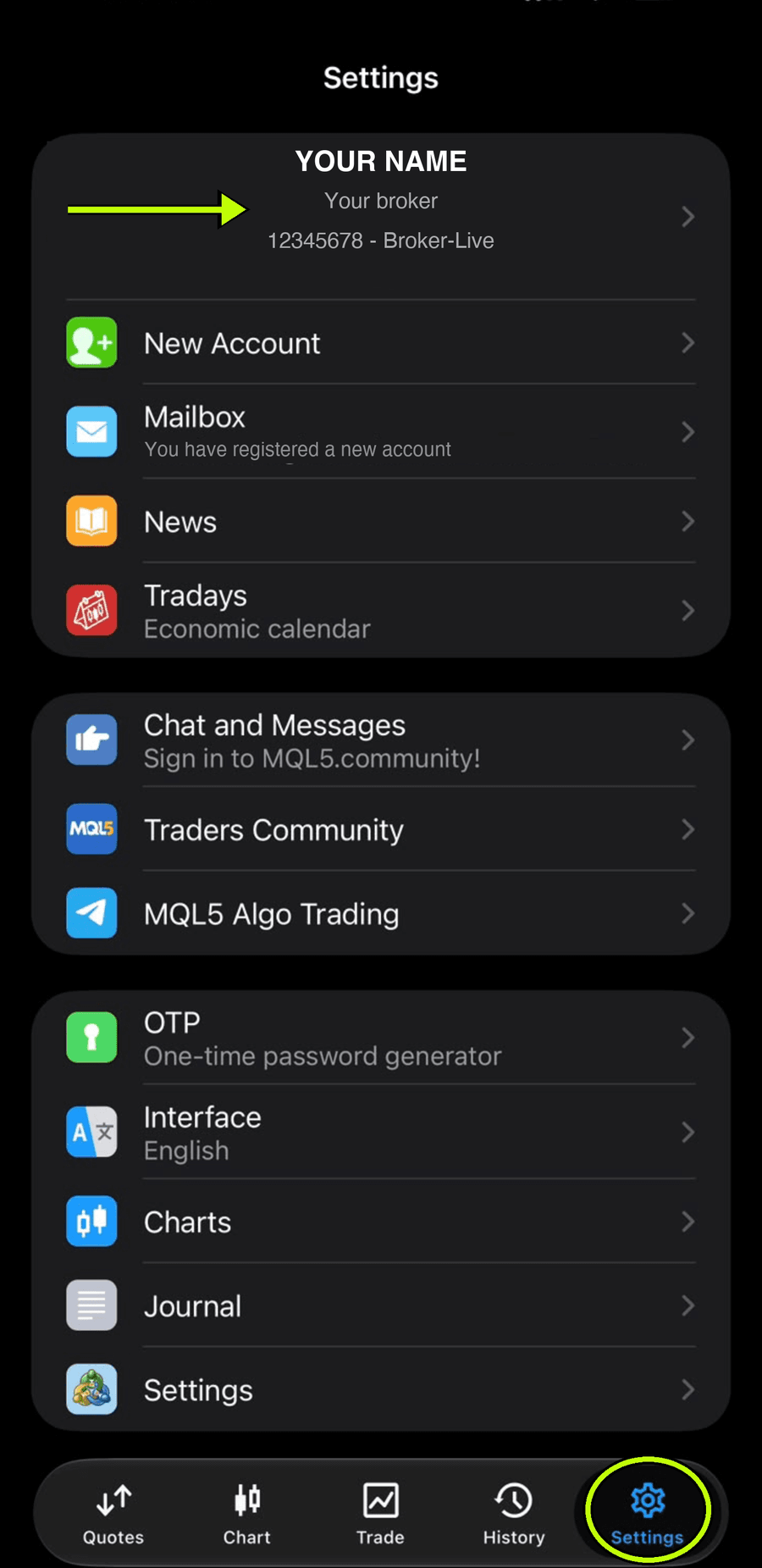
Step 2: Settings, then your account at the top. - Tap Change Password.
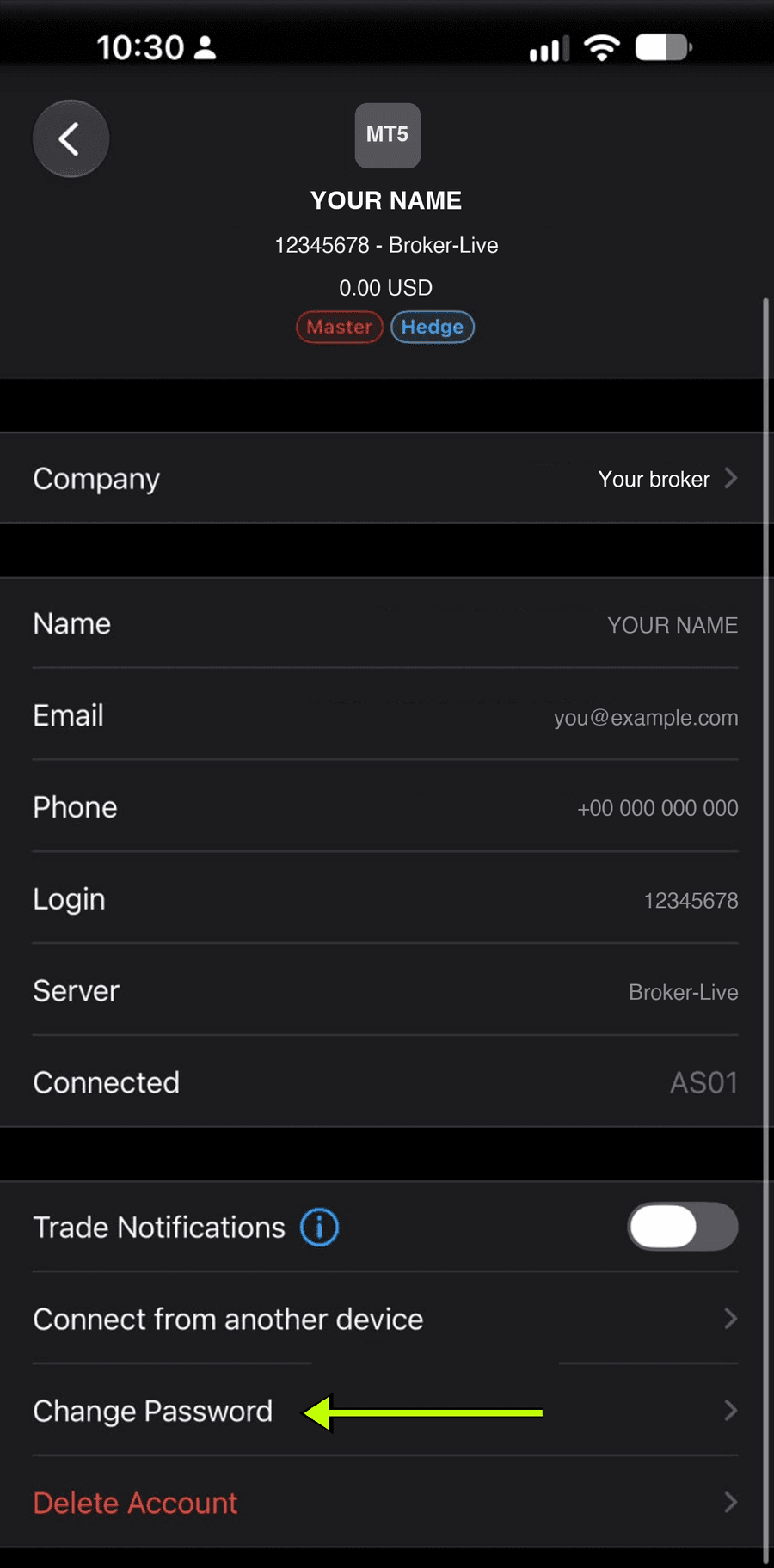
Step 3: Change Password. - Choose Investor (read only).
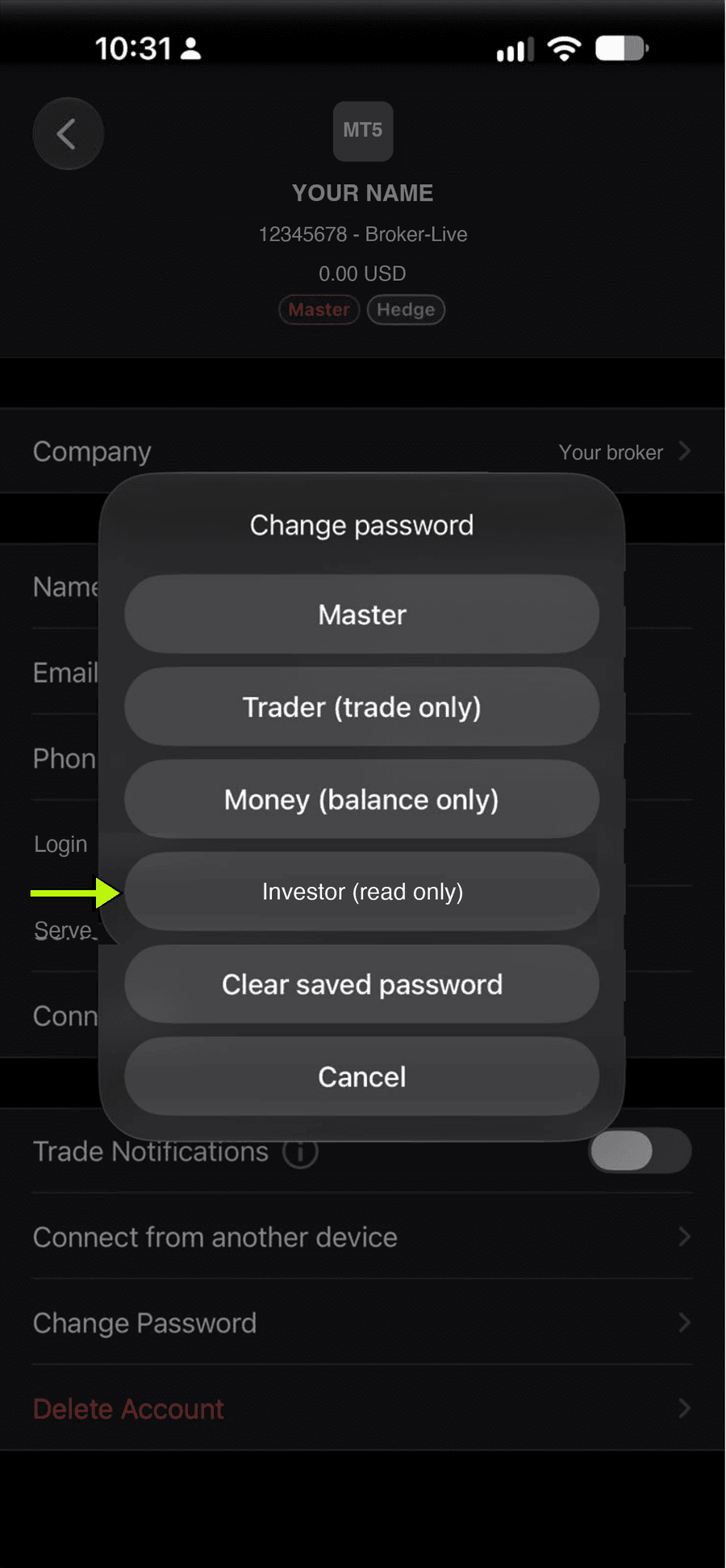
Step 4: Investor (read only). - Enter your main password, then type a new investor password twice and save.
That investor password is the one you enter on LotsBack. It can only read your account: it can never place, change or close a trade, and it cannot move money. If your broker emailed you an investor password with your account details, you can use that one instead: see Where do I find the investor password?
On the desktop app: Tools → Options → Server → Change → Change investor (read only) password.
What does LotsBack need for a TradeLocker account?
Your TradeLocker email, the server, and your TradeLocker password. The password is used once to sign in and is not stored. If the login has more than one account, add the account ID too.
Is it safe to give LotsBack my investor password?
Yes. It is read-only by design. LotsBack cannot trade, transfer or withdraw with it. It is stored encrypted, and you can change it at the broker at any time.
Can I connect more than one trading account?
Yes. Connect as many as you trade, at one broker or several. Each account has its own card, its own state and its own lines.
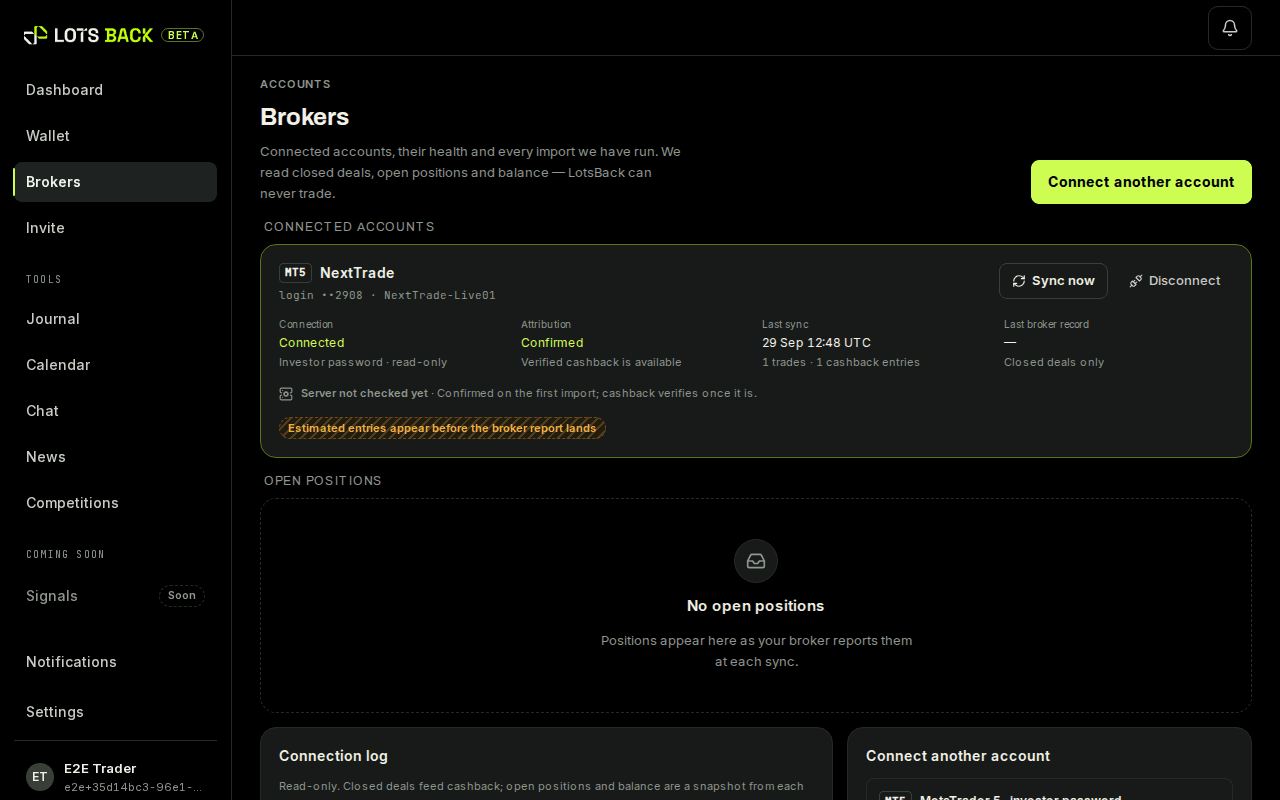
Accounts: one card per connected account. How do I remove a broker account?
Open Accounts, tap the account, then Disconnect. LotsBack stops reading it and keeps its history. Your other accounts stay connected. Closing your LotsBack account itself is a separate step: see How do I close my account?
Why does it say the account is already linked to another LotsBack user?
Because that login is connected to a different LotsBack account. A trading account can only belong to one person here. If it is yours, email support@lotsback.com.
Why does my account say Not eligible?
Because it is a demo, cent, ECN or Raw account, or on a server LotsBack cannot pay on. The account still syncs and shows in your tools. It does not earn cashback.
How the broker credits LotsBack
What does Confirmed by the broker mean?
The broker has told us your trading account is with LotsBack. Only then does the broker pay LotsBack for your trading, and only then can LotsBack pay you.
How does LotsBack check that the broker credits my account?
It asks the broker. After you connect, LotsBack checks with the broker within the hour, and again on a schedule until the answer is clear. The account card shows the result.
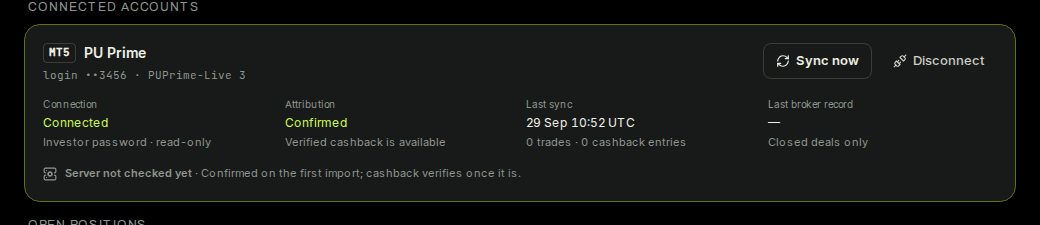
Confirmed by the broker, on the account card. How long does the check take?
Usually under an hour for an account opened through the partner link. Until then the card says Pending, and every figure is an estimate.
What does Confirmed mean on my account card?
The broker has told us the account is with LotsBack. From now on every eligible lot you close is priced and joins that week.
The account card once the broker has confirmed. What does Not found at your broker mean?
Your broker does not have this account with LotsBack. That usually happens when it was opened from the broker's own site, not through our link.
The broker does not list my account. What can I do?
Ask the broker to move your account to LotsBack. In LotsBack, press Move my existing account and follow the steps. If the broker will not move it, open a new account through our link.
Can both my old account and my new account stay connected?
Yes. Both show in your journal and calendar. Only the account the broker moved to LotsBack earns cashback.
I opened another account with my broker. Does it count?
Yes, if your profile is already with LotsBack. Open the new account in your broker's client portal with the same email, so it sits under the same profile, then connect it in Accounts. Open a Standard or STP account. ECN and Raw accounts do not earn cashback. If your profile is not with LotsBack yet, ask the broker to move it first; a new account does not fix that.
Can I earn cashback on trades from before I joined?
No. Cashback counts only the trades you open after the broker confirms the account. Older trades still appear in your journal.
Moving an account you already have
How do I move my broker account to LotsBack?
You ask your broker, and LotsBack backs the request. In LotsBack, press Move my existing account and pick your broker. Follow the steps in your broker's portal. Then give LotsBack your name, email and User ID (UID).
Where is the transfer page in my broker's portal?
It is in the client portal on the web, not in the trading platform. Open your profile and look for Transfer IB or Change IB. If you cannot find it, ask the broker's support to move you.
What is a partner code?
It is the code your broker uses for a partner such as LotsBack — your broker may call it the IB number. LotsBack shows the right one for your broker, with a button to copy it.
What is my User ID (UID)?
It is the number your broker gives you as a person. You find it on your profile in the broker's portal. It is not your trading account number.
Why does LotsBack ask for my name, email and User ID (UID)?
So the broker can find you. LotsBack sends the three to the broker's partner manager. They match them to your request and approve the move.
Do I keep my login and my balance when I move?
Yes, when the broker moves the account itself. The login and the balance stay as they are. Only the partner the account sits under changes.
Do I have to close my trades before I move?
Yes, close them first. Your broker may ask you to confirm that no position is open.
How do I know the move has gone through?
Your request reads Approved. LotsBack checks the broker's list for you. The account card then reads Confirmed by the broker.
How long does the move take?
Usually 2 to 3 days after your broker gets the request. Your broker decides, so nothing else is needed from you. Trades opened before the move do not earn cashback.
What if my broker says no to the move?
Your request reads Not approved, with the reason. You can ask again after 72 hours. Or open a new account through the partner link and connect that one.
Do the lots I traded before the move earn cashback?
No. Cashback counts only the trades you open after the broker moves your account to LotsBack, whenever they close.
How lots are counted
What is a lot?
The unit your broker uses for trade size. One standard lot of EURUSD is 100,000 euros. A trade of 0.10 lots counts as a tenth of a lot. Cashback is paid per lot, so size matters and direction does not.
How is cashback calculated?
Lots closed, times your broker's published rate per lot. Nothing else. The rate, its conditions and its effective date are printed on the broker page.
When is a trade counted?
When it closes. An open position earns nothing yet. The moment it closes, LotsBack writes an estimate for it at the published rate.
Does a partial close count?
Yes. Each part that closes is counted at its own size. Close 0.5 of a 1.0 lot position and 0.5 lots are counted, then the rest when it closes.
Do all instruments count?
No. Each broker says which instruments it pays on — all three cover forex pairs, gold, silver and crude oil; indices and crypto do not earn. A trade outside that is rejected, with the reason.
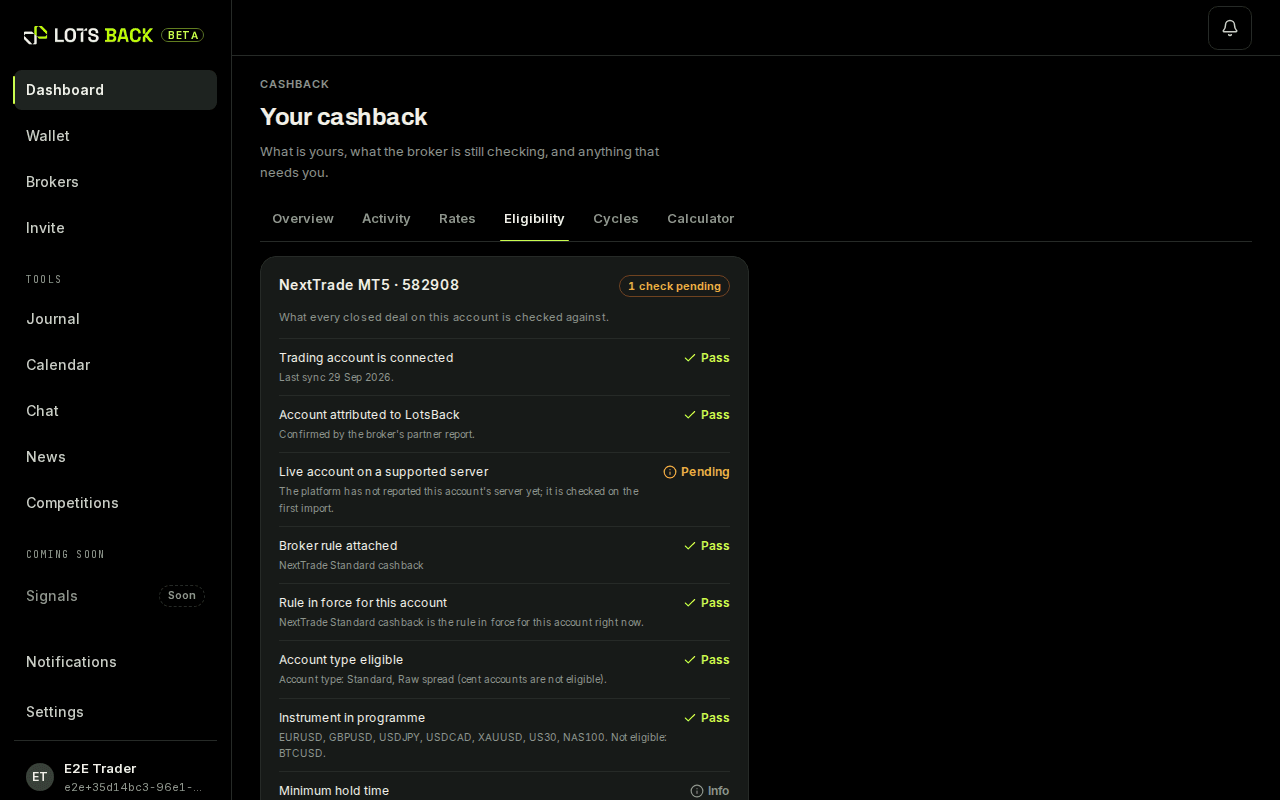
Eligibility: which instruments and account types the rule covers. Is there a minimum trade size or hold time?
Sometimes. A broker's rule can set a smallest size or a shortest hold time. Trades under either are rejected at verification, with the reason shown on the line. The broker page prints the limits.
Do you pay cashback on broker credit or bonus funds?
No. Cashback is paid on your own money only. If your broker adds credit or a bonus to your account, only your own money's share of each lot counts. With a balance of 200 and broker credit of 200, half of each lot counts, so 1.00 lot traded is paid as 0.50. Broker credit on its own earns nothing. The Signals seat needs one full counted lot, so credit slows it down. The Signals page in the app shows your progress. Each trade shows its share as "Real money only: X% of the lots count", and your account shows the share while credit is on it.
Do hedged trades earn cashback?
No. A trade is hedged when a buy and a sell on the same instrument are open at the same time in one account. The lots that overlap earn no cashback. The rest of each position still counts.
Where is the rate per lot published?
On the broker's page here, with the date it took effect. The same rate is used to price every estimate and is printed on every receipt.
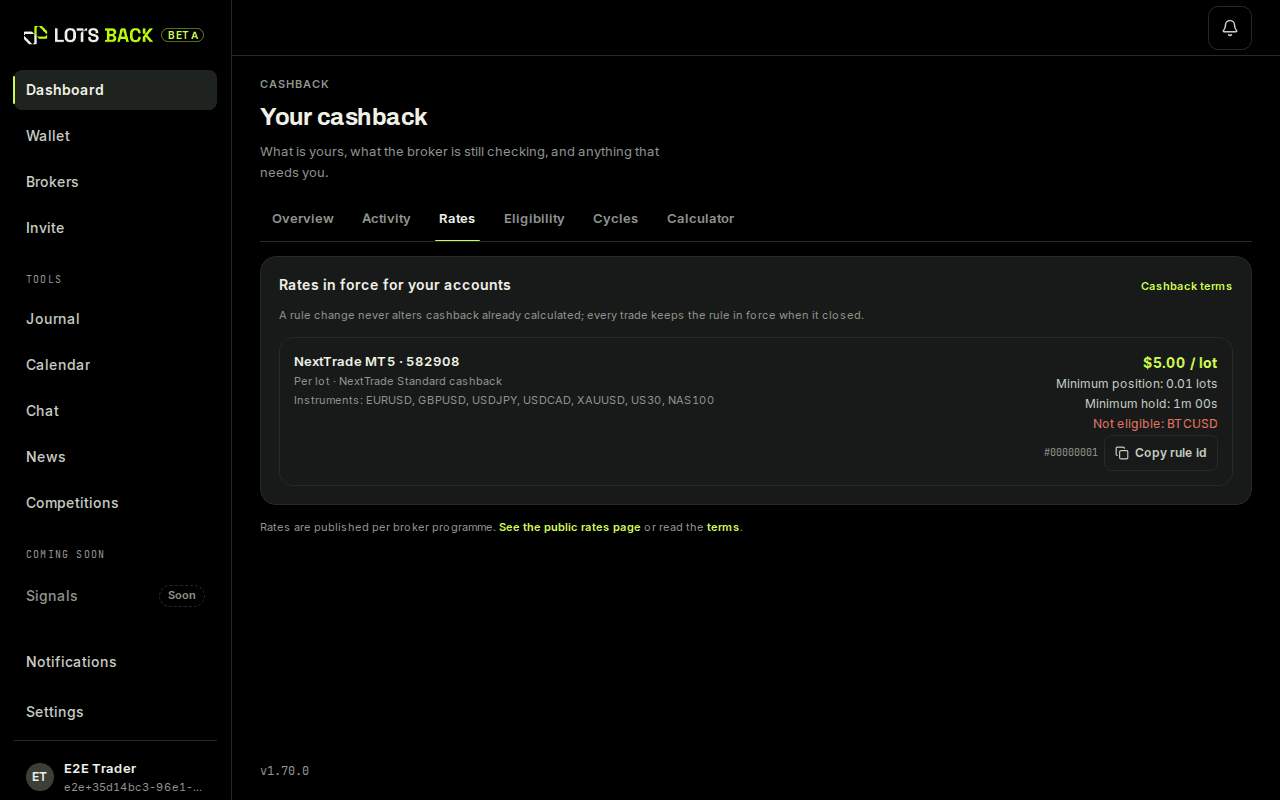
Rates: the published rate per lot for each connected broker. Can the rate change?
Yes, with notice. A new rate gets a new effective date on the broker page. Trades closed before that date keep the old rate.
How soon does a closed trade show up in LotsBack?
Usually within the day. Trades are read from your broker account on a schedule, and each closed trade appears with its estimate. Press Sync now on the account card to queue an earlier read.
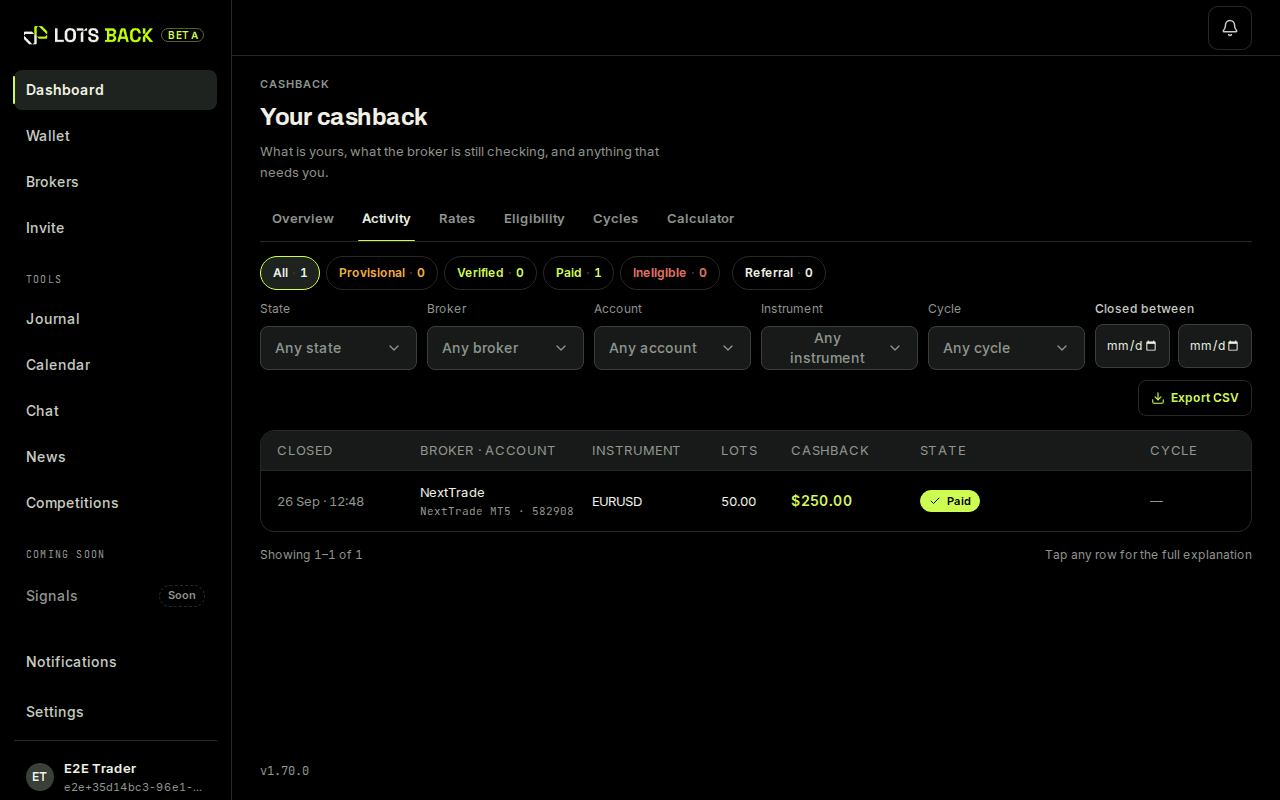
Activity: each closed trade with its estimate. A trade I closed is missing. Why?
Either the read has not run yet, or the trade is on an account that is not connected. Check the account card first. If it is still missing a day later, email support@lotsback.com with the ticket number.
The ten states
Why does my amount say Estimated?
Because your broker has not confirmed it yet. It becomes Verified when the broker's report matches it, and Available when the week is released.
What does Verifying mean?
The week has closed and LotsBack is checking your lines against the broker's report. Nothing to do; it moves on when the check is done.
What does Verified mean?
The broker's report agrees with the line: the lots, the rate and the amount are confirmed. It becomes Available when the week is released.
What does Available mean?
It is money. Available is the amount LotsBack owes you and pays on request. Everything before this state is an estimate that can still change.
Available on the dashboard. Only this is money. What do Reserved, Processing and Paid mean?
They are the three steps of a payout. Reserved: you asked for it and the amount is set aside. Processing: it is being sent. Paid: it has arrived, and the receipt shows the transaction hash.
What does Failed mean?
The payout did not go through. The amount returns to Available with its own line, and you can ask again. Nothing is lost.
What does On hold mean?
A person is looking at it. A line goes on hold when something needs a check, for example a report that does not match. It stays visible, and it is released or rejected with a reason.
What does Rejected mean?
The line will not be paid, and the reason is printed next to it. Common reasons: the broker did not pay for that lot, the instrument is outside the rule, or the trade was under the minimum.
Verification and the week
What is a week?
One week of trading, checked as a group. Every estimate from that week is checked together, and when the week is released the verified amounts become money you can withdraw.
Weeks: one row each, with its state. How long does verification take?
A week closes every Sunday. Checking it against the broker's report usually takes a few business days, depending on when the report arrives. A line that does not match goes to a person to review.
What is the broker's report?
The broker's own record of what it paid LotsBack for your trading. LotsBack matches it to your closed trades line by line. A match becomes Verified.
Can an amount go down?
Yes. An estimate can be corrected or rejected at verification — the instrument is not covered, say, or the position was held for less than the minimum time. Every change is its own line, with a reason.
What if the broker does not pay for a lot?
Then LotsBack does not pay cashback on it. We pay only what the broker actually paid for. A line the broker did not pay for closes as rejected, with the reason printed next to it.
What if my broker paid for fewer lots than I traded?
Then the week is paid on the smaller figure. Your estimate is our reading of your own trading; what you are paid is the lots your broker actually rebated, after our eligibility rules. Your account page shows both for every week, so you can see which one decided: Estimated, Not eligible, Broker paid, Paid. The earliest trades of the week are paid first. The lots the broker did not pay for close as rejected, with the reason next to them. If you think a trade should have counted, contact your broker's support with your login and the trade ticket.
Can I see every change to my cashback?
Yes. Your history lists every line: each trade, each correction, each payout. A change is always a new line with a reason and a date.
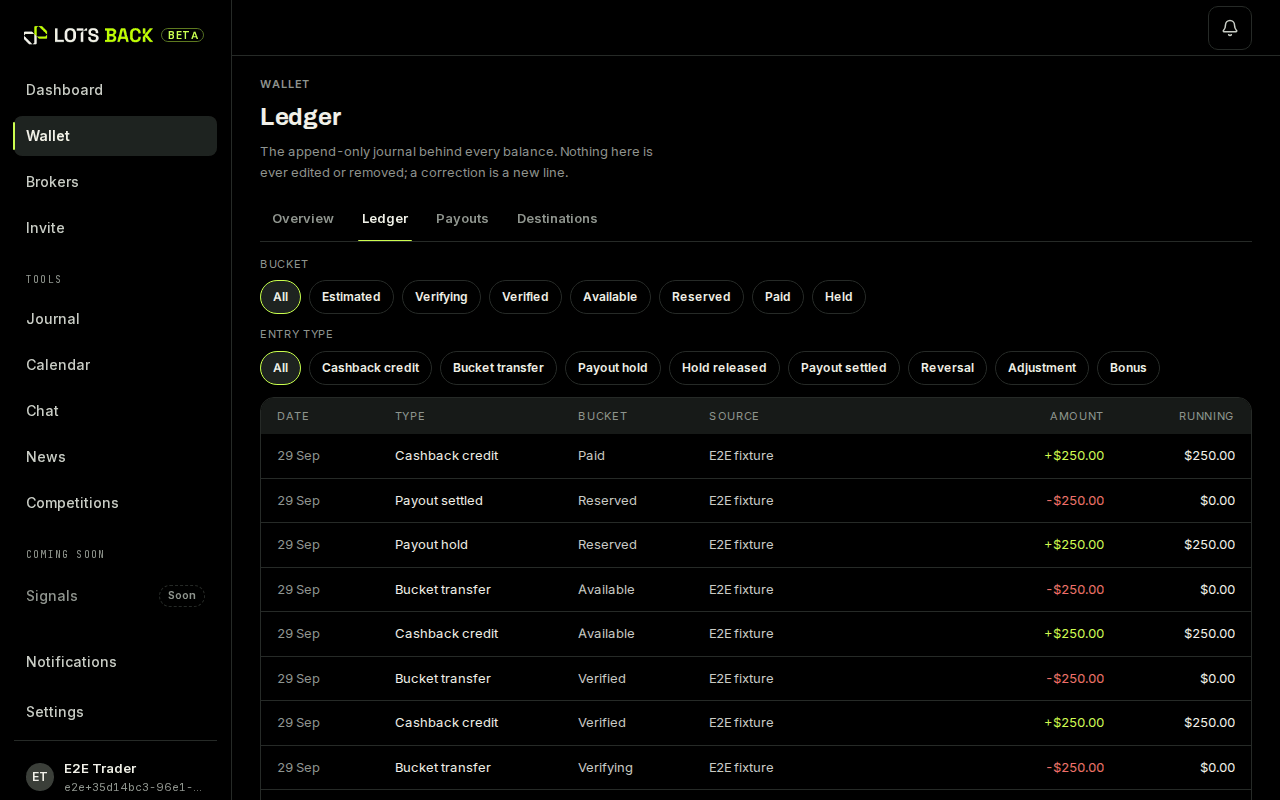
Your history: every line, with its reason and date.
Payouts
When can I withdraw?
As soon as an amount is Available and clears the minimum for your asset and network. There is one payout run a week.
How is cashback paid out?
In USDT on Ethereum or Tron, or USDC on Ethereum, to a wallet address you add yourself. The payouts page lists each pair with its minimum. The network fee is taken from the payout, and you see it before you confirm.
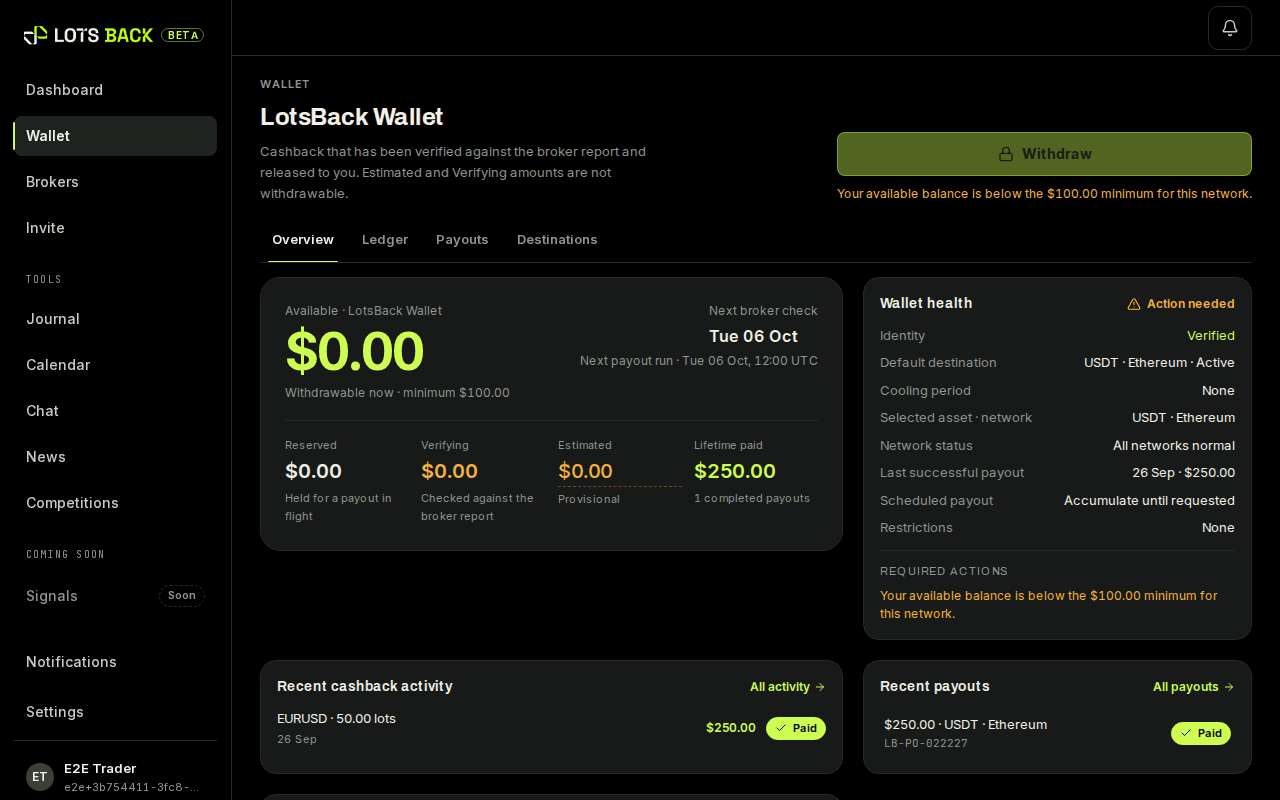
Wallet: Available, the minimum, and Withdraw. Can I be paid to a bank account or a card?
No. Payouts are in USDT, on Ethereum or Tron, or USDC on Ethereum. You can send either from your wallet to an exchange and change it there.
What is the network fee and who pays it?
The fee the blockchain charges to send the token. You pay it, out of the payout. LotsBack shows the fee before you confirm and does not add anything to it. Tron is usually the cheaper network.
How do I add a wallet address?
In Wallet, under Payout addresses. Pick the asset and the network together, for example USDT on Ethereum. Paste the address. Then confirm it with your authenticator app.
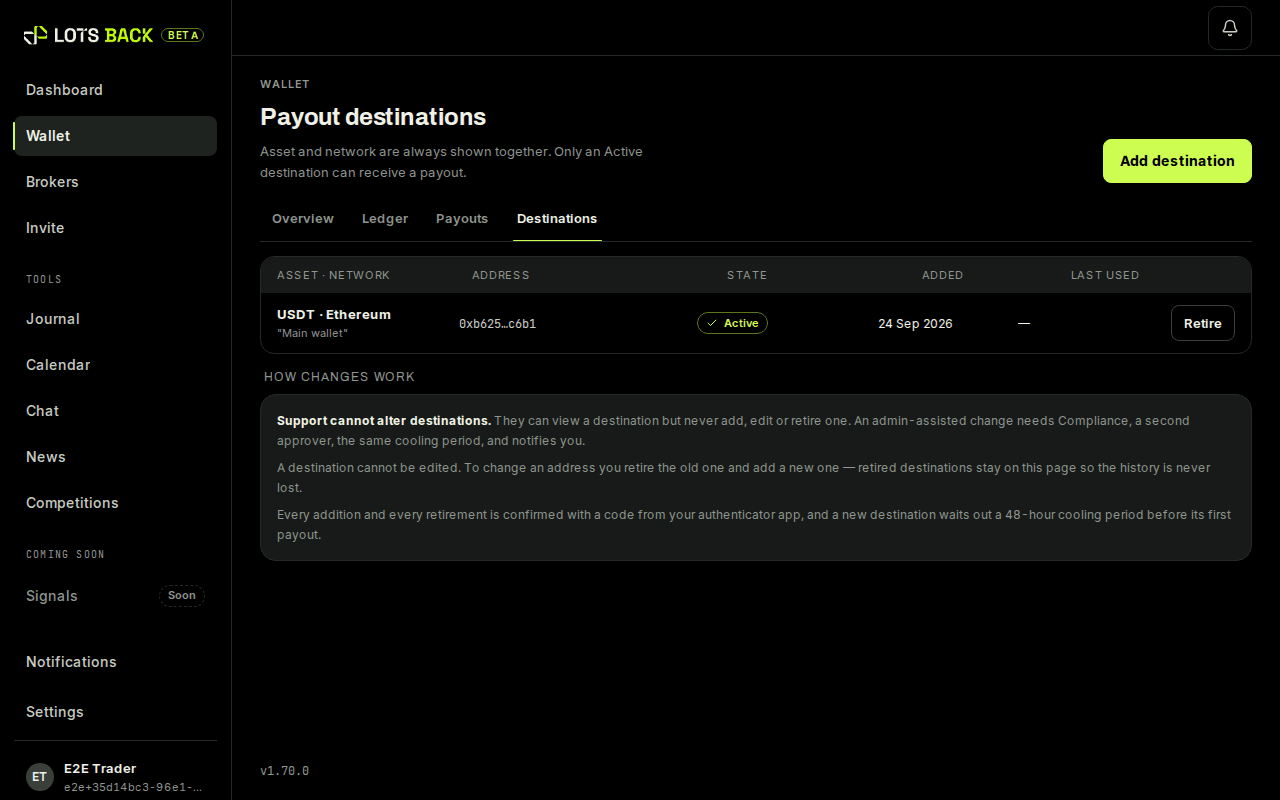
Destinations: asset and network together, then the address. Why does a new address have to wait?
For safety. A new address waits 48 hours before its first payout. If someone else added it, you have time to remove it. Add your address early so it is ready when you are.
What happens if I paste the wrong address?
Check it before you confirm. A payout sent to a wrong address on a blockchain cannot be recalled by anyone. The 48-hour wait is there so you can remove a wrong address in time.
What proof do I get?
A receipt for every payout. It lists the positions it came from, the rate used, the asset and network, the wallet address and the transaction hash.
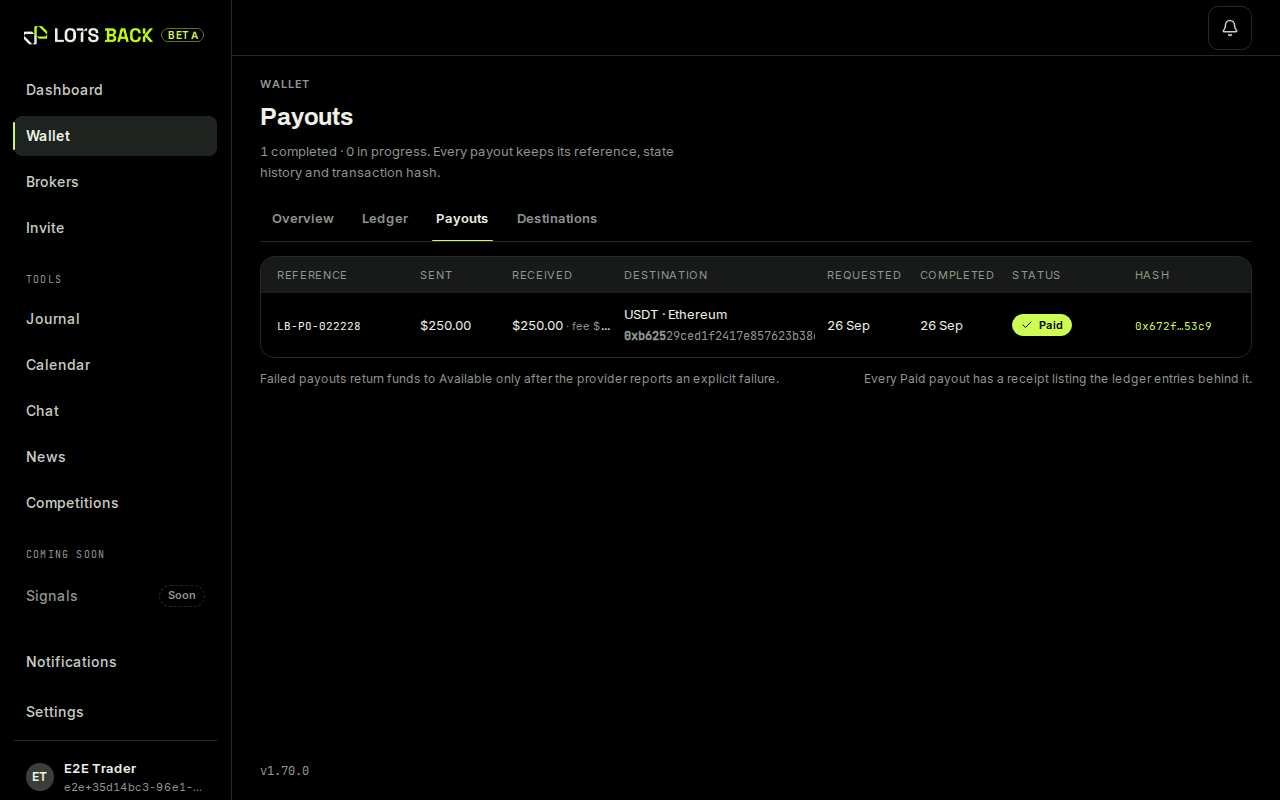
Payouts: each one with its reference and receipt. What happens if a payout fails?
The amount goes back to Available, with its own line and the reason.
Is there a minimum payout?
Yes, per asset and network. The payouts page lists each minimum. Below it, the amount stays Available and joins the next request.
Do I pay tax on cashback?
That depends on where you live. LotsBack does not give tax advice. Your history and receipts give you the full record if you need one.
Inviting other traders
Can I earn by inviting other traders?
Yes. Share your invite link. When someone joins through it and trades, you earn a commission per lot they close. The Invite page shows the rate and your invites.
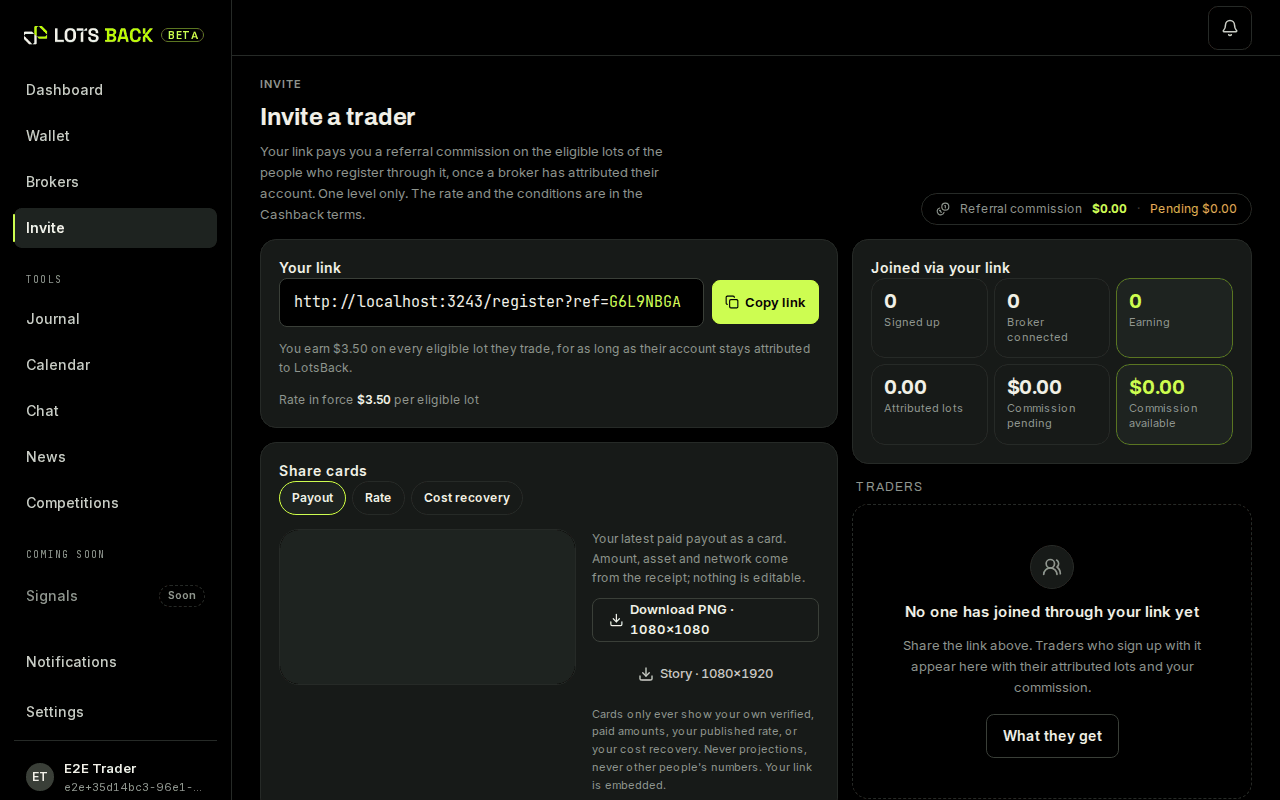
Invite: your link and what each invite earns. Does my invite lose anything?
No. They get the full published cashback. Your commission comes from LotsBack's share, not from theirs.
When is invite commission paid?
On the same weekly schedule as cashback, through the same states, into the same wallet.
Is invite commission paid on estimates?
No. Invite commission is worked out on the lots the referred trader was actually paid for, never on their estimate. If a week's lots were only partly rebated, a commission already worked out on the estimate is reduced to the paid figure. The reason is shown on the line. Any individually agreed rate and partner commission work the same way.
The tools
What tools come with the account?
A trading journal, a calendar and market news, built from the accounts you connect. They are included at no charge. Cashback is the product. The tools come with it.
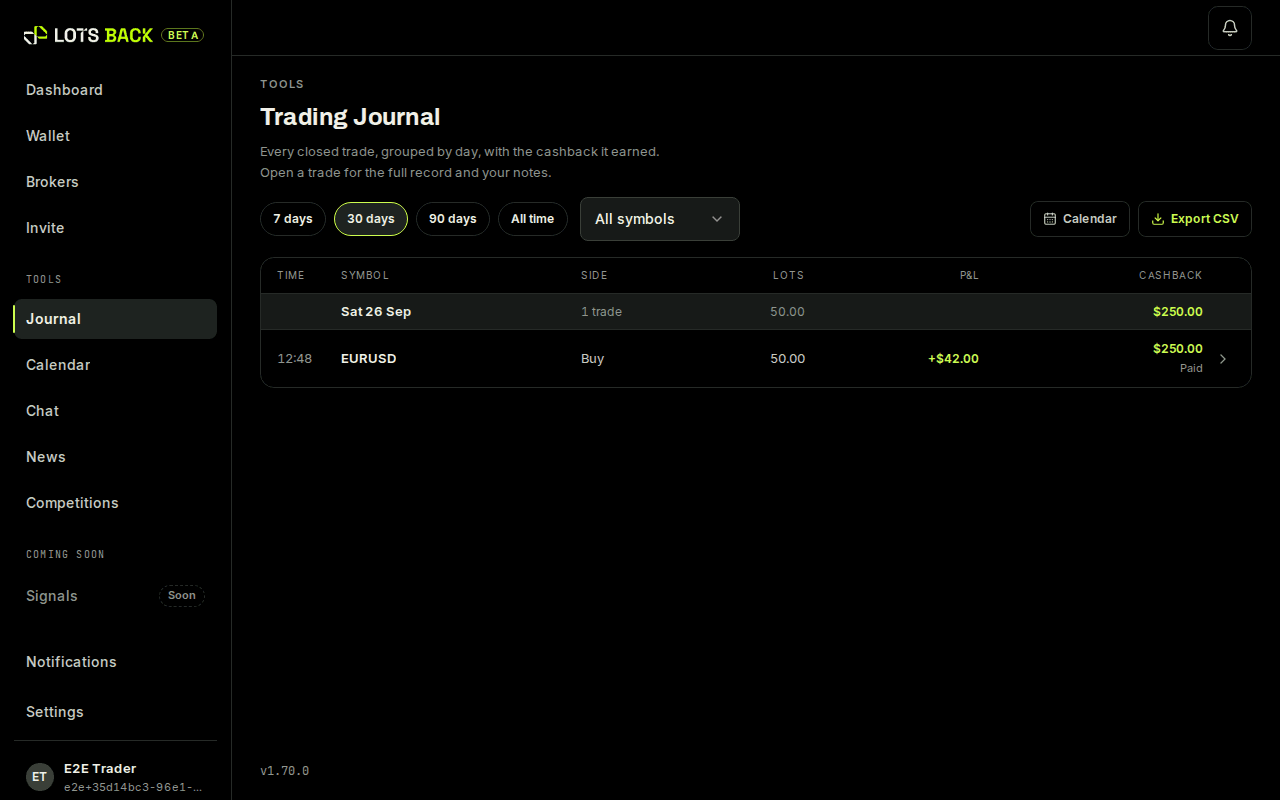
The journal, built from your closed trades. Does the journal work on an account that does not earn?
Yes. A demo, cent or unsupported account still syncs into the journal and the calendar. Only cashback is marked Not eligible.
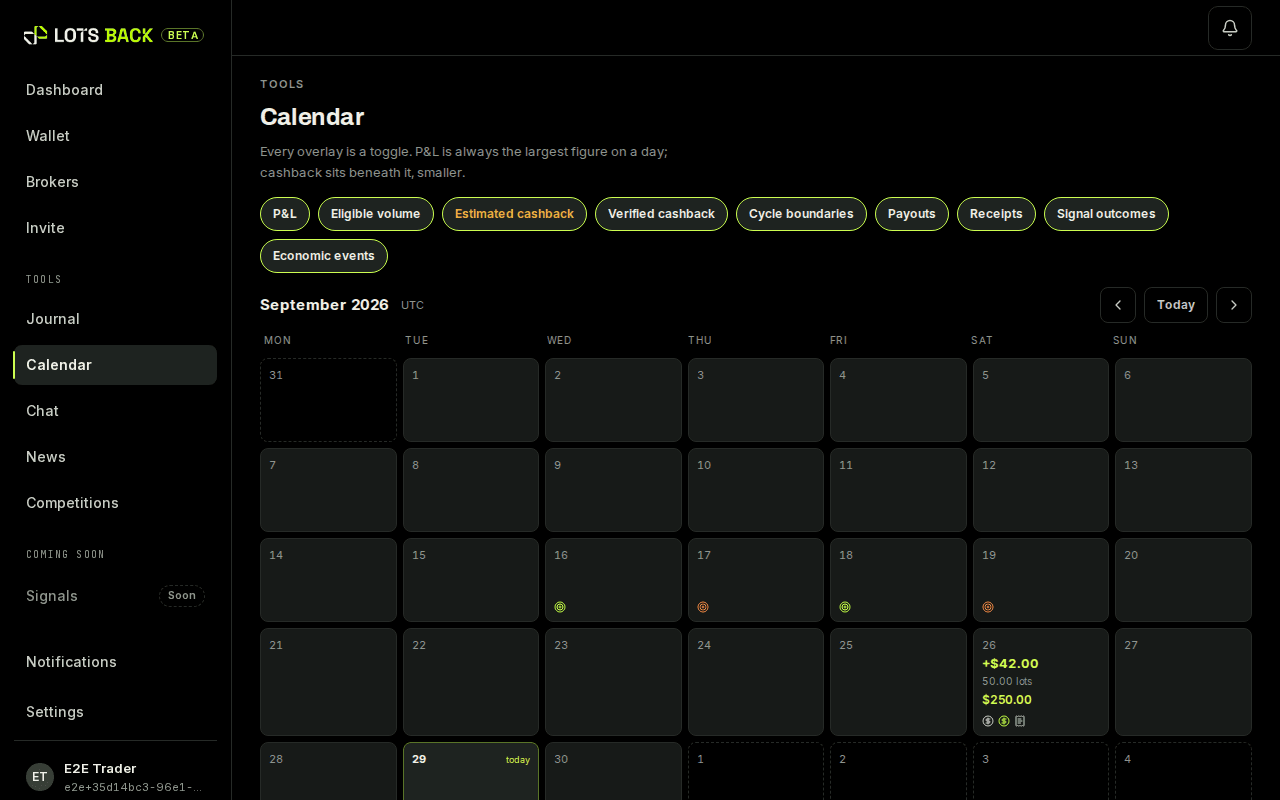
The calendar: every trading day, earning or not. What is the coach?
A chat about your own trading record. It runs on your own AI key, which you add in Settings. Without a key, the chat is off. LotsBack does not pay for it and does not read your chats.
How do I join the LotsBack Signals group?
LotsBack Signals is a private Telegram channel, by invite only. A trader posts buy and sell ideas there every day. To get in, connect a Standard or STP account through LotsBack with your own money on it. Then trade one eligible lot on that account: a lot your broker has paid us for; an estimate does not count. Open the Signals page in the app and follow its three steps. A seat you have earned stays yours. A signal is general information, not advice for you.
Security and privacy
Can LotsBack trade on my account?
No. The connection is read-only. An investor password cannot place, change or close a trade, and it cannot withdraw.
What data does LotsBack store?
Your account details, the trading accounts you connect, the closed positions read from them, the cashback lines built from them, and your payout addresses. The privacy notice lists it in full.
Is my broker password stored?
Your investor password is stored encrypted, because LotsBack needs it to read trades. A TradeLocker password is used once to sign in and is not stored. Your main broker password is never asked for.
What is the authenticator app for?
For the changes that matter: adding or removing a payout address. A withdrawal is confirmed with a code sent to your email. You set the app up in Settings.
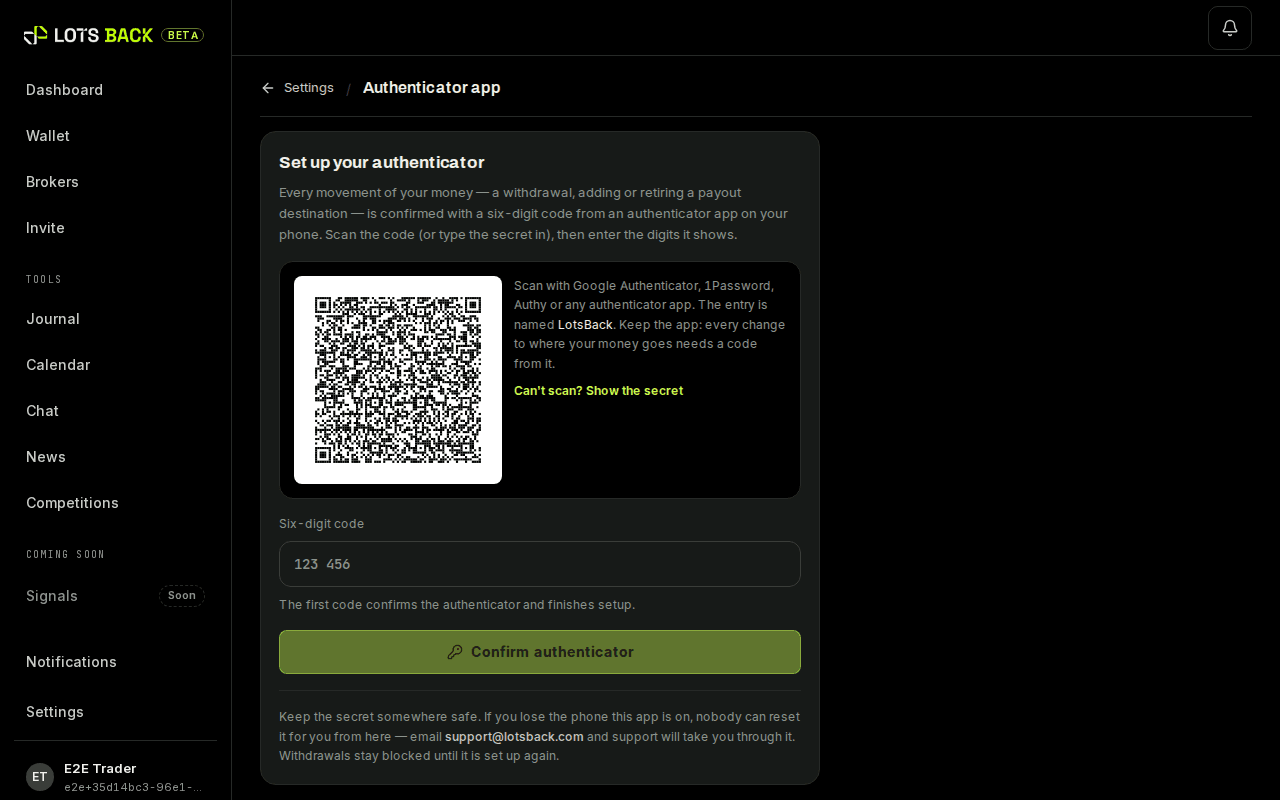
Settings: the authenticator app.
When something looks wrong
My estimate has not moved for days. Is something wrong?
Probably not. Estimates change state once a week, when the week closes and the broker's report arrives. Check the date on your dashboard; if it has passed and nothing changed, email support@lotsback.com.
Weeks: when the current one closes. The card says Pending for more than a day. What now?
The broker has not answered yet. Check that the account was opened through our link. If it was, wait one more check. If not, ask the broker's support to move it to LotsBack, then press Reconnect.
The connection failed. What should I check?
The server name, copied exactly from the broker's email. The login, which is the account number. And the investor password, not the main one. A typo in any of the three is the usual cause.
How do I contact support?
Email support@lotsback.com from the address you signed up with. Include the account number and, for a trade, the ticket number. Every action in the app has a reference you can quote.
Getting help
What can the support chat answer?
Questions about LotsBack and about your own account: your trades, your weeks, your wallet, your payouts and your invites. Open it from the chat button in the app. It is AI, so it can make mistakes.
Does support read my chat?
Yes, support may read your chat to help you. The panel says so under the box where you type. Chats are kept for 90 days.
How do I reach a person?
Ask the chat for a person, or press Open a ticket under an answer. A person replies in your account within 24 hours. You can open up to five tickets a day.
What is my Support PIN?
Eight digits that show an email to support comes from you. Find it under your name in the app: in the sidebar on a computer, on your profile page on a phone. Open it and the PIN appears, with Copy and New PIN. Give it to support when they ask, so they know it is you. It changes each time support uses it.
When does support ask for my PIN?
Only in a reply to an email you sent us, before we answer a question about your account. We never ask for it first. Never send it anywhere else.
What if I send the wrong PIN?
You can make three wrong tries in a day. After that, PIN checks on that email stop for 24 hours. Open the app to see your current PIN.
Can I get help by email?
Yes. Write to support@lotsback.com, our only support address, from the address you signed up with. Have your Support PIN ready: it is under your name in the app. Put it in the subject line as PIN 12345678, or in the message, and account questions are answered straight away. Without it, support asks you for it first.
Can I rate an answer?
Yes. Under a chat answer, press the thumbs up or down. Under an email answer, press Yes or No. We read the ratings to make the answers better.
Can I write in Spanish?
Yes. Write in Spanish, by chat or by email, and the answer comes back in Spanish.
Step-by-step guides
The whole path in order: your LotsBack account, the trading account at the broker, then connecting the two. One walkthrough per broker.
Trade normally.
Get lots back.