Loading the page
Keep the VT Markets account you have. Ask VT Markets to move it to LotsBack, then tell LotsBack who you are so VT Markets can approve it.
IB stands for introducing broker: the partner your broker pays for your trading. Moving your account to LotsBack means LotsBack becomes that partner, and shares what it is paid with you.
Cashback is an estimate until your broker confirms the week and it is paid. Cashback terms.
Create your account or sign in. Enter your email, press Send magic link, then click the link in the email.
During setup, choose I already have an account on the Broker screen. After setup, press Move my existing account on your dashboard or under Accounts. Then pick your broker from the list.
LotsBack shows our partner code for your broker, with a Copy button. You paste it into the broker's form in Part 2. Keep the LotsBack tab open; you come back to it.
Start in LotsBack.
Our partner code for VT Markets is shown there.
The steps VT Markets gives in its own help centre, in its client portal on the web.
Sign in to your VT Markets client portal on the web. This is where you deposit, not the trading platform.
In the portal, open Profile, then Transfer IB/CPA/Account Manager.
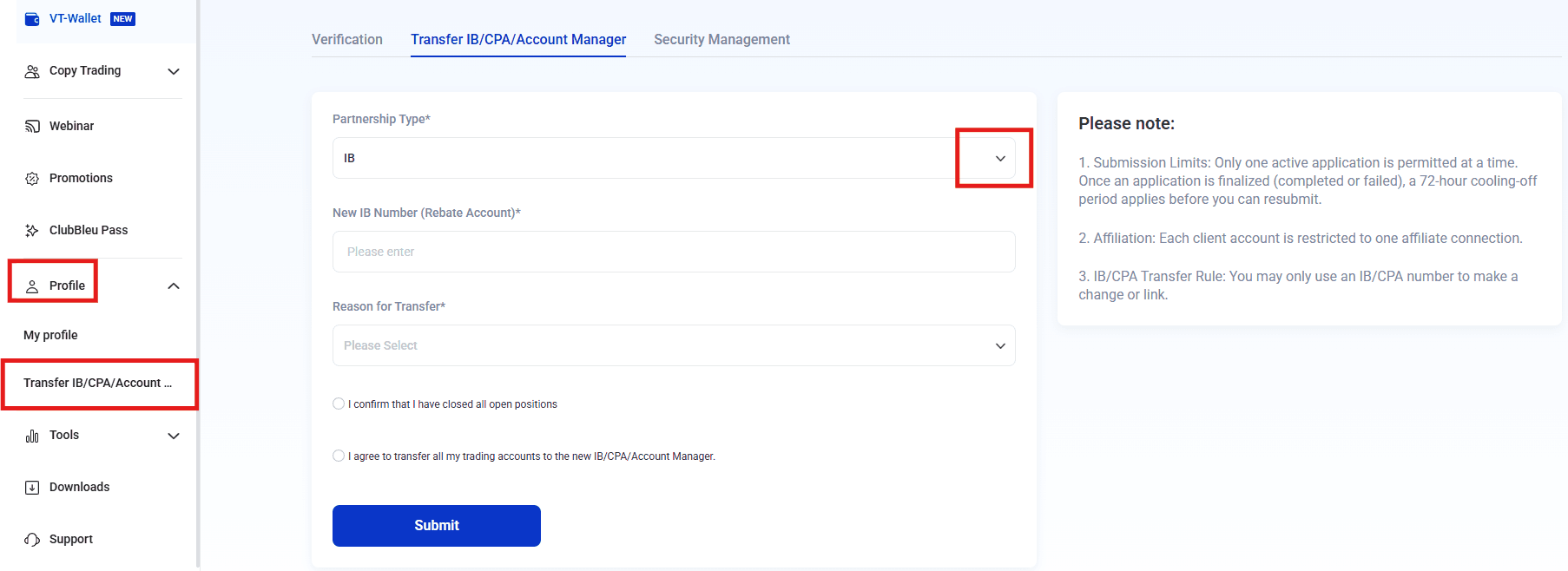
In Partnership Type, choose IB.
In New IB Number (Rebate Account), paste ours.
Choose a reason from the list. Cashback with LotsBack is enough.
Tick both declarations, then press Submit. Progress shows under Application History.
Screenshot from VT Markets' help centre, 23 September 2026.
Read the broker's own help article(opens in a new tab)See VT Markets' own guide: How do I apply to change to another partner program(opens in a new tab)No such page? Some brokers only move an account when you ask their support. Send them this by live chat or email.
Hello, Please move my account to the IB below. New IB number: Getting code… My User ID (UID): [your UID] Email on my account: [your email] I have closed my open positions. Thank you.
Back in the LotsBack tab, under the steps, enter what your broker holds for you.
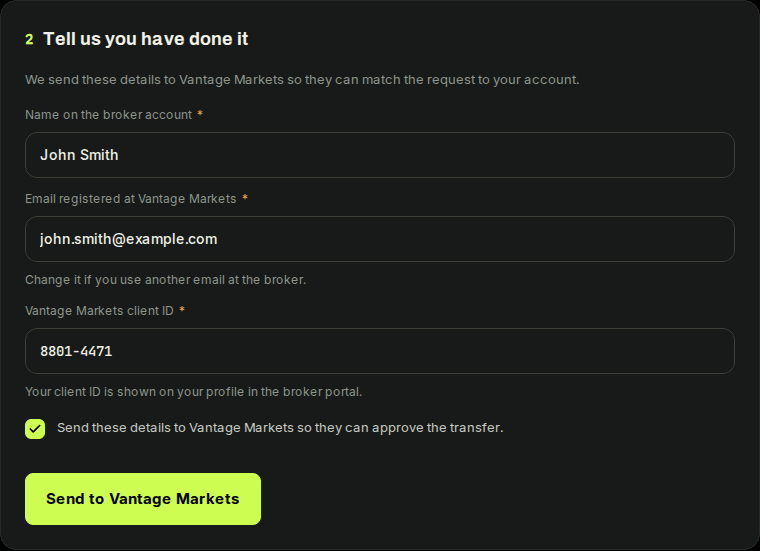
The box lets LotsBack send these details to your broker. LotsBack then emails the broker's partner manager, so they can match the request to your account and approve it.
Press Connect this account and enter the server, login and investor password. You do not have to wait for the broker. The journal and the calendar work from the first sync.
Approval is the broker's step. While it waits, your request reads Sent to your broker. LotsBack checks the broker's list for you.

Once the broker moves the account to LotsBack, the request reads Approved. The account card reads Confirmed by the broker.
Every eligible trade you open after that is priced at the published rate and counts in the week it closes. Trades opened before the move do not earn, whenever they close.
The request reads Not approved, with the reason. You can ask again after 72 hours. If the broker will not move the account, open a new one through the partner link and connect that. Both accounts can stay connected. Only the one the broker has moved to LotsBack earns.